Showing posts with label legacy. Show all posts

Tuesday, December 20, 2022

TUESDAY'S TIPS ~ Using Legacy's Search Function to follow up on previous research


This is Tuesday’s Tip for those who use Legacy as their personal database.  I am using version 9, but this tip should work with most recent earlier versions.

A question was recently asked on the Legacy Users Facebook group.  If you haven’t joined this group, I highly recommend it. 

There are 26,119 members and it’s a very active group with several posts per day.

Everyone from beginner’s to experienced users are welcome.  The questions asked each day are responded to quickly by the many, around the world, members.

As experienced as I am with this program, I am always learning a new tip or trick.

The question posed by the user was “Is there a way I can search for a certain word in the General notes field and then delete the note?”

The answers –

·       You can use a search and replace to search notes for a word or phrase and then delete or replace it.

·       You can use the Detailed Search tab and find what you are looking for Individual>General/Research/Medical Notes>Contains>use the word or phrase you are looking for>Create List

I have personally done the Detailed Search many times to find things in my program.  Today I decided to use it to locate all those individuals for whom I have entered the word "verify" or the phrase "need to" or a version of it, in Research Notes.

I keep extensive research notes, including the date I entered a particular note.  In doing so, I often type something up and enter a phrase such as “verify this”  “need to verify this” or something similar.

I may not see that note again until I am researching that particular person.  It could be YEARS between my research on a particular line or person.

How many people have I written a “verify” or "need to" note for and have I gone back and done so?

Here’s the screen shot showing my Search.

(Please click on any image to enlarge it)
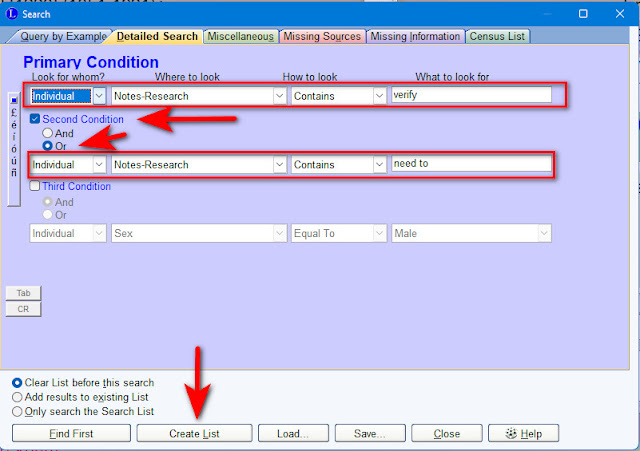
My search created a list of 279 individuals!  Legacy uses the Search List to allow you to view the list you have created.  From this you can use the various tabs.  This is very handy because I can see exactly what I have entered into the Research Notes and decide if it’s important enough for me to go back and work on.  I can also quickly edit those notes if needed.

Here is a sample showing a view of my Research Notes for Addison Nichols Boggs.  You can see that my notes are dated 2009 and 2011 and that I clearly have not gone back and entered further research notes.  Meaning I've never followed up on this.


Creating a list such as this gives me a direction to focus my research, should I choose to do so.  I doubt I can clear up all 279 individuals for whom I have the words “verify” or “need to.”  But, I can save the list and go back to it occasionally and work through it.  It would be a great project during those evenings in front of the TV or on a nice rainy day. 

Would this type of search be helpful to you?  Do you keep research notes and if so, do you follow up?  I’d love to hear from you.

If you are related to or connected to anyone in this or any of my other blog posts, please get in touch.  Let’s exchange information.

Happy hunting,

Michigan Girl

Copyright ©  2010-2022   Diane Gould Hall
ALL RIGHTS RESERVED.  NO USE WITHOUT PERMISSION


Sunday, March 24, 2019

52 Ancestors in 52 Weeks–Week #11–This week’s theme is the number 12


The theme this week is the number 12.  This could be used many different ways.  The 12th person in your Ahnentafel list, number 12 in your RIN (Record Identification Number) in your genealogy program, the 12th month or 12th day. By the way, Ahnentafel is a German word for “ancestor table.”

At first I thought I would write about the ancestor who has number 12 in my Legacy program.  These numbers are randomly assigned.  But, that number belongs to my sister-in-law, Melinda.  While I’d love to write a story about her, because she is one of my favorite people, I won’t because of all the people associated with her, who are, thankfully, still living.  Here is a post I wrote last year, about Melinda's 2nd great grandfather William Davies. SUNDAY’S OBITUARY ~ William Davies, born in Scotland in 1825–died in Washington, D.C. in 1904
 
I’ll refocus and use my Legacy program to tell me which ancestors have a birthdates, marriage dates or death dates in December.  To do this use Search>Detailed search and enter your criteria as shown below, then click on “create list.”


My results were:
228 people born in December
216 people married in December
210 people died in December

Exercises like these can be a fun way to take a break from your research.  Most genealogy programs will allow you to do searches like this one and so many more things.  We are all lucky to be doing our research at a time when we have such robust software to assist us.

To read my other tips on using Legacy click on this link Legacy Tips

HERE ARE OTHER BLOG POSTS I’VE WRITTEN ABOUT SEARCHES

How to Conduct a Location Specific Search on Family Search

Michigan Death Records Online - Where Can You Find Them?

Happy hunting,
Michigan Girl

Copyright ©  2010-2019   Diane Gould Hall

ALL RIGHTS RESERVED.  NO USE WITHOUT PERMISSION

Thursday, July 14, 2016

POTENTIAL PROBLEMS LIST IN LEGACY 8 ~ What problems did I find today?


It’s necessary with any database, to check for problems, errors etc.  Legacy 8 has a built-in feature for doing just that.  It’s called “Potential Problems” and can be found under your Tools tab.

(CLICK ON ANY IMAGE TO ENLARGE IT)

Legacy potential problems tool 
Since I run this feature about once a month, my problems list is usually very small.  Of course, that wasn’t true the first time I ran it.  I can’t remember exactly how many I had, but I know it was dozens.  It took me a while to go through the list, but it was a worthwhile endeavor.

Today, I ran the list, and here’s what I got.

Legacy potential problems list-2

LET’S TALK ABOUT WHAT WE CAN DO WITH THIS LIST
  • The name that is highlighted is Boggs, Virginia [3934].  I always have the RIN number listed after my individuals as it makes it very easy to find them quickly in the Index or write the numbers down, should I need to come back later.
  • At the bottom of the screen, you can see that Legacy tells me exactly what the problem is.  In this case “The birth date for this individual is either after the mother’s death date or more than ten months after the death date of the father.”
  • I can do several things directly from this list.
    1.  Print it
    2.  Mark as Not a Problem
    3.  Run the report in different ways
    4.  Report destination can be Screen, Text file or PDF file

I went to the family page for Virginia Boggs.  I can see that her birth date is listed as “Abt 1848.”  I have an 1850 census for her and her family which states that she is two years old.  The next census in 1860 lists her as 11.  So, the birth year of approximately 1848 is probably correct.

Now, let’s look at her father, Hamilton Boggs.  OH OH!  I have his death date as “Abt. 1842.”  Kind of tough for him to have been Virginia’s father if she was born 6 years later.  I don’t have a second marriage for her mother, and Virginia is the last child, of 6, listed for this family.

Hamilton Boggs is my 3rd great granduncle, and I can see that I have done very little thorough research on him.  I have one source listed and it’s an email from another descendant, that I received back in 2005.

My next step, as I sit here this morning, will be to go online and begin trying to piece together Hamilton’s life with more valid sources.  I’m sure there has been a lot of sources made available over the past 11 years.

Then I will move on to the other person listed on my Problems Report.

This report provides an excellent method for us to find the problems we might not have noticed and, in this case, to go back to a fairly close ancestor, and do more research.
 
Have you used the Potential Problems report?  What have you found?

Please visit the tab “Legacy 8 Tips” at the top of my blog for 12 other posts that are specific training tools for using Legacy 8.

Happy hunting,
Michigan Girl

Copyright ©  2010-2016   Diane Gould Hall
ALL RIGHTS RESERVED.  NO USE WITHOUT PERMISSION

Saturday, September 6, 2014

ADDING A RECORD TO LEGACY FROM ANCESTRY–Step by step instructions


One of the members of a Facebook group (Technology for Genealogy) I belong to asked a question this morning.  I thought this would be a good topic to share with you.

This group member was switching from Family Tree Maker to Legacy. She asked how we would recommend she save things she found on Ancestry to the Legacy database so that she doesn't lose what she finds.  She has been used to Family Tree Maker and Ancestry syncing all the records. I have written this post in response to her question.  

My primary database is stored in Legacy.  I have a couple of trees on Ancestry.  The “working” tree is private and I use it to share with relatives and to glean any hints that Ancestry might come up with.  The other tree is public, but I don’t have any pictures attached to it.  I still get plenty of contact from new cousins this way.

Back to our topic.  ADDING A RECORD TO LEGACY

Today I have chosen to learn more about Charles Louis KING, the son of my great grandaunt.  At this point I don’t know very much about him or his wife.

Here is a screen shot of what I have at this point.

(CLICK ON ANY IMAGE TO ENLARGE IT)

A-Charles L King first screenshot

Our goal is to try and find every record we can from the time someone is born until their death, by using every method we have learned.

Here is the screen shot showing exactly what facts and events I currently have for Charles L. King.

A-Charles L King screenshot2

Now, let’s take a look on Ancestry and see if there is anything new?  Are there any new hints?

A-Charles L King screenshot3

NO HINTS!  I don’t let that deter me.  Now I will click on “Search Records” located just under his photo.

As I scroll through the first page of records that come up I see one that could be a match.

A-Charles L King screenshot4

The names look like a match (closer than the other names I’ve seen on this list). 

I will click on that record and bring up the page on Ancestry. 

A-Charles L King screenshot5

For this exercise, I will add this event to Charles L. King.  I need to find more evidence that this is, in fact, the same Charles L. and Emma M. King. I do know that Charles was widowed and living with his parents in Lexington, Fayette Kentucky in the 1930 census. 

Now I will go to Charles King’s Event/Fact page in Legacy and begin to add this event. (See the events/facts in the screen shot above for Individual’s Information)

1.  Click on the “Add” icon  

A-Charles L King screenshot6

2.  In the Add/Edit Event screen use your drop down list to bring up the event/fact you want to record.  If there isn’t an event/fact in the list that meets your needs, then add your own.  If I remember correctly, I had to add the “City Directory Listing” event myself.  I wanted this to be very specific, not just residence or location.

3.  Now fill in the top portion with description, date & place.  Your event screen should now look like this.

A-Charles L King screenshot8

4.  Back on the Ancestry page showing the details for this listing I highlight the pertinent data.  I don’t want everything on the page, only the detail.  I roll my mouse over the data from “Name” down to “1921” at the end of the listing.  Your data should now be highlighted as shown below.

A-Charles L King screenshot9

5.  Now you can right click with your mouse and choose “copy” or use the shortcut Ctrl C.

6.  Go back to your event/fact screen in Legacy and in the NOTES area for the City Directory Listing, place your cursor and use “paste” or the shortcut Ctrl V.

Your Event will now look like this.

A-Charles L King screenshot 10

7.  Since there is an image available for this event, I will add that image.  I won’t go into detail here about adding images or sources to Legacy.  They have tutorials on their website and in their CD’s for that.  The image is added just like any other image, by clicking on the little picture frame icon at the top of the event screen.

8.  The next thing I would do is enter the source for this information. 

When you are finished your entry will look like this.

A-Charles L King screenshotA

You have entered your event, sourced it and added an image.  This entire process takes less than 5 minutes.  

You perform these same steps for every event, whether it’s a census record, World War I or II registration card or obituary.
 
This creates your timeline for this individual and allows you to review it and see what you might be missing.  In Legacy you can click on “Chronology” and all of these events are listed.

I hope this post was helpful.  Now go add some events.

OTHER POSTS THAT MAY BE OF INTEREST
ADDING SIBLING LINKS TO FINDAGRAVE 
ADDING SIBLING LINKS TO FINDAGRAVE - AN UPDATE 
LEGACY 8 - THE SEARCH FUNCTION - WHAT CAN YOU FIND?

Happy hunting,
Michigan Girl


Copyright ©  2014   Diane Gould Hall
ALL RIGHTS RESERVED.  NO USE WITHOUT PERMISSION

Sunday, January 19, 2014

TOP 100 GENEALOGY WEBSITES FOR 2014–According to GenealogyInTime Magazine

clip_image002

The top 100 genealogy websites for 2014, was published by GenealogyInTime Magazine Magazine, an online magazine.  Please visit their website (by clicking on their name)for a complete list and an explanation of how they compiled their list.  

Congratulations to the 4 blogs that made it onto this list:

11.  Eastman’s Newsletter by Dick Eastman http://blog.eogn.com/eastmans_online_genealogy/

63.  Canada’s Anglo-Celtic Connections by John D. Reid http://anglo-celtic-connections.blogspot.com/

81.  Geneabloggers by Thomas McEntee http://geneabloggers.com/

89.  Genea-Musings by Randy Seaver http://www.geneamusings.com/

And the 3 software programs on the list are:

49. Legacy

Click here to go to the Legacy website


61.  RootsMagic   http://www.rootsmagic.com/

76.  Family Tree Maker  http://www.ancestry.com/cs/apps/P-5194?o_xid=57140&o_lid=57140&o_sch=Search

Good work by all.  Check the list for your favorite sites or to find new ones.  

Here is a portion of the profile of the GenealogyInTime Magazine as posted on their website
http://www.genealogyintime.com/about-us.html


  About Us

GenealogyInTime Magazine is the fifth largest free genealogy website in the world (according to Alexa the internet traffic source). People like our website because we are independent and we provide valuable, honest information. We are also much more than just an online magazine. We are a genealogy platform with tools and resources to help people find their ancestors.
It also helps that we are free.
Philosophy – We have a passion for genealogy and a determination to make it better. Our mission is to help people find their ancestors.
History – We launched our magazine in November 2008.
Newsletter - We offer a free weekly newsletter. Please read 7 Reasons to Subscribe to our Newsletter.
 

Happy hunting,

Michigan Girl

Copyright ©  2014   Diane Gould Hall