

A question was recently asked on the Legacy Users Facebook group. If you haven’t joined this group, I highly recommend it.
There
are 26,119 members and it’s a very active group with several posts per day.
Everyone from beginner’s to experienced users are welcome. The questions asked each day are responded to quickly by the many, around the world, members.
As experienced as I am with this program, I am always learning a new tip or trick.
The question posed by the user was “Is there a way I can search for a certain word in the General notes field and then delete the note?”
The answers –
· You can use a search and replace to search notes for a word or phrase and then delete or replace it.
· You can use the Detailed Search tab and find what you are looking for Individual>General/Research/Medical Notes>Contains>use the word or phrase you are looking for>Create List
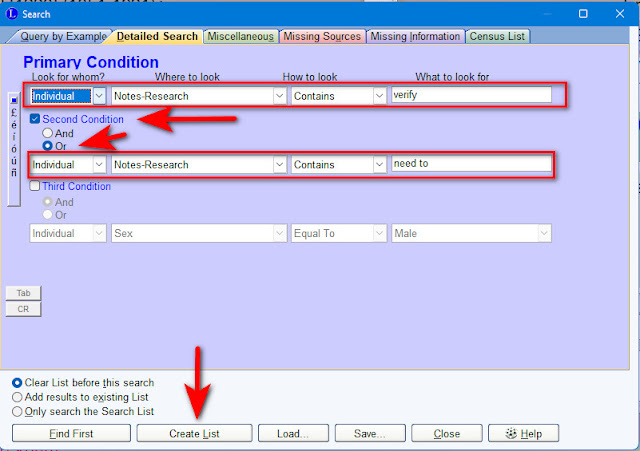
I have personally done the Detailed Search many times to find things in my program. Today I decided to use it to locate all those individuals for whom I have entered the word "verify" or the phrase "need to" or a version of it, in Research Notes.
I keep extensive research notes, including the date I entered a particular note. In doing so, I often type something up and enter a phrase such as “verify this” “need to verify this” or something similar.
I may not see that note again until I am researching that particular person. It could be YEARS between my research on a particular line or person.
How many people have I written a “verify” or "need to" note for and have I gone back and done so?
Here’s the screen shot showing my Search.
(Please click on any image to enlarge it)
My search created a list of 279 individuals! Legacy uses the Search List to allow you to view the list you have created. From this you can use the various tabs. This is very handy because I can see exactly what I have entered into the Research Notes and decide if it’s important enough for me to go back and work on. I can also quickly edit those notes if needed.
Here is a sample showing a view of my Research Notes for Addison Nichols Boggs. You can see that my notes are dated 2009 and 2011 and that I clearly have not gone back and entered further research notes. Meaning I've never followed up on this.

Creating a list such as this gives me a direction to focus my research, should I choose to do so. I doubt I can clear up all 279 individuals for whom I have the words “verify” or “need to.” But, I can save the list and go back to it occasionally and work through it. It would be a great project during those evenings in front of the TV or on a nice rainy day.
Would this type of search be helpful to you? Do you keep research notes and if so, do you follow up? I’d love to hear from you.
If you are related to or connected to anyone in this or any of my other blog posts, please get in touch. Let’s exchange information.
Happy hunting,
Michigan Girl
ALL RIGHTS RESERVED. NO USE WITHOUT PERMISSION


