Showing posts with label #tuesdaystips. Show all posts

Tuesday, December 20, 2022

TUESDAY'S TIPS ~ Using Legacy's Search Function to follow up on previous research


This is Tuesday’s Tip for those who use Legacy as their personal database.  I am using version 9, but this tip should work with most recent earlier versions.

A question was recently asked on the Legacy Users Facebook group.  If you haven’t joined this group, I highly recommend it. 

There are 26,119 members and it’s a very active group with several posts per day.

Everyone from beginner’s to experienced users are welcome.  The questions asked each day are responded to quickly by the many, around the world, members.

As experienced as I am with this program, I am always learning a new tip or trick.

The question posed by the user was “Is there a way I can search for a certain word in the General notes field and then delete the note?”

The answers –

·       You can use a search and replace to search notes for a word or phrase and then delete or replace it.

·       You can use the Detailed Search tab and find what you are looking for Individual>General/Research/Medical Notes>Contains>use the word or phrase you are looking for>Create List

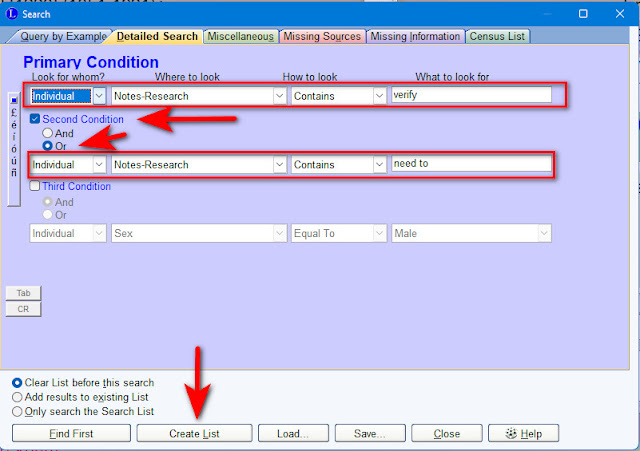
I have personally done the Detailed Search many times to find things in my program.  Today I decided to use it to locate all those individuals for whom I have entered the word "verify" or the phrase "need to" or a version of it, in Research Notes.

I keep extensive research notes, including the date I entered a particular note.  In doing so, I often type something up and enter a phrase such as “verify this”  “need to verify this” or something similar.

I may not see that note again until I am researching that particular person.  It could be YEARS between my research on a particular line or person.

How many people have I written a “verify” or "need to" note for and have I gone back and done so?

Here’s the screen shot showing my Search.

(Please click on any image to enlarge it)
My search created a list of 279 individuals!  Legacy uses the Search List to allow you to view the list you have created.  From this you can use the various tabs.  This is very handy because I can see exactly what I have entered into the Research Notes and decide if it’s important enough for me to go back and work on.  I can also quickly edit those notes if needed.

Here is a sample showing a view of my Research Notes for Addison Nichols Boggs.  You can see that my notes are dated 2009 and 2011 and that I clearly have not gone back and entered further research notes.  Meaning I've never followed up on this.


Creating a list such as this gives me a direction to focus my research, should I choose to do so.  I doubt I can clear up all 279 individuals for whom I have the words “verify” or “need to.”  But, I can save the list and go back to it occasionally and work through it.  It would be a great project during those evenings in front of the TV or on a nice rainy day. 

Would this type of search be helpful to you?  Do you keep research notes and if so, do you follow up?  I’d love to hear from you.

If you are related to or connected to anyone in this or any of my other blog posts, please get in touch.  Let’s exchange information.

Happy hunting,

Michigan Girl

Copyright ©  2010-2022   Diane Gould Hall
ALL RIGHTS RESERVED.  NO USE WITHOUT PERMISSION


Tuesday, December 29, 2020

TUESDAY’S TIPS ~ New cousin connections made from watching a 10 minute video


No matter how long we have been researching our ancestors, we are always learning something new.  Whether we attend classes at our local society, read any of the wonderful blogs by my fellow bloggers (there are over 3,000 of them), get a tip from a fellow genealogist, watch webinars, learn from Facebook groups,  or attend a conference in person (when that becomes possible again).  There is no shortage of learning opportunities.

I decided to watch a quick 10 minute video offered by Legacy (the software program I’ve used for years).  This was a short tutorial about how to make connections on the 23&Me website for DNA.

While my DNA and my mother’s are on that site, as we both tested there.  I’ll admit to not using the site very often (I use the Ancestry DNA site all the time).  All of us have our favorites.  I’ve tested or have results uploaded to all the major DNA sites.

The tutorial I watched was called Connection Requests at 23andMe by Michelle Leonard M.A., PgCert.  As I said before it is 10 minutes long and rated as Beginner.  Click here for a link to the video. 

After watching it, I went right to 23 & Me and began inviting some of my matches to share their DNA with me.  Now, we all know that sending any kind of message to someone on any of the sites is a “longshot.”  Will they respond?  Did they even receive my message? The chances of getting a response are low (I speak from experience and information from others).  But, I had not really sent requests for more than a handful of matches on 23 & Me over the past 7-8 years.

I wanted to try and make contact with some of the people in the DNA tree automatically built on the website.  Knowing that some of the suggestions I’ve seen on that tree are quite accurate and others are not.  I was going for the low hanging fruit.  These are the people at the bottom of the tree created using my DNA.  Here is an image showing how these people appear in the automatically created tree.

(Please click on any image to enlarge it) I have blurred the names for privacy 

I sent 9 requests to connect, using the suggestions from the video.  As suggested I kept it simple, no attached message, just a request to share DNA. This allows me to see the matches we share in common and to view the chromosome browser.  Viewing the chromosome browser allows me to paint that match into DNA Painter.

How many would you expect to hear back from?  I thought I’d be very fortunate if one person responded. 

SURPRISE!  I heard back from 3, accepting my invitation to share.  They all responded within a day. None of the other 6 have responded...yet.

In the past few days I’ve been communicating with all 3 of those matches and have new cousins to add to my tree, as a result. 

As a matter of fact I was so excited to figure out the match between me and a match named Cheryl, that I spent 4 hours building a tree on Ancestry, for her family.  She only gave me 2 names to go on, Edward Riggs and Audrey Gerkin.  No dates, no places.  Using Blaine Bettinger’s Quick & Dirty trees idea, I began building.  I used obituaries, census records, birth, marriage and death records to try and build this tree back several generations.  We’ve all seen CeCe Moore and others go through this process to find unknown parentage and criminal suspects.  I’ve built several of these kinds of trees before, but cannot claim much success. 

NOTE:  When you do build a Q&D tree it should be private AND UNsearchable. You don’t want anyone else to use it or take items from it since you are not conducting exhaustive research on each person and do not want to proliferate errors.

Within four hours of starting that Q&D tree, at 10:59 p.m. I located who I believed to be our Most Recent Common Ancestor!  WOW! I was excited and very proud of myself. 

Now what?  Time to go down the descendant line from that common ancestor and really look closely to make sure I’m correct.  This is where you slow down and look at all the records as in our regular, due diligence, research.

What was my conclusion?  I was right on the money.  Cheryl and I share my 3rd great grandparents, Monson THORP & Lany COOPER.  They are my 3rd and her 4th great grandparents.  She's a generation younger than I am.  I also share DNA with her mother, a woman who’s name I have seen numerous times on various DNA sites and had no idea how we connected…..until now. 

Here is an image of that Q&D tree


Now, Cheryl and I are talking back & forth and she told her mother about our discovery. There are things they didn’t know about some of the lines I have information about.  We will talk more after the new year and they may have some photos and other information for me.  I will gladly share anything I have with them.

On another note. One of the other matches and I have also been in touch and she actually lives in Detroit.  We are also connected through the Thorp line, but via another route.  She has all her parent’s family research and lots of information.  We also plan to talk after the new year.

ALL of this from a 10 minute video.  Never stop learning and never stop looking. 

If you have any comments or you’ve had a similar experience, I’d love to hear about it.

Happy hunting,

Michigan Girl

Copyright ©  2010-2020   Diane Gould Hall 

ALL RIGHTS RESERVED.  NO USE WITHOUT PERMISSION

Tuesday, August 4, 2020

TUESDAY'S TIP ~ Republishing my Ancestry tip - Watch out for that checked box - How I finally located the 1870 census for my 3rd great grandparents

I've been instructing new and experienced researchers how to use Ancestry lately.  This question has come up "what about the match all terms box?"  
Here's a good explanation of why we should be careful it's not checked.......all the time.


US fed census match all

I’ve been researching my Thorp family for the past 15 years.  This is a direct line for me and I want to learn as much as I can about them.  My Dad always talked about his paternal grandparents, William Val Gould and May Thorp Gould.  He called his grandmother Mema (pronounced Mee Ma).

During this research I was able to locate every census for my 3rd great grandparents, Monson Thorp, Sr. and his wife Lany Cooper Thorp…….except the 1870 census.  They married on 12 Apr 1835 in Cato, Cayuga, New York and had 6 children.  I located them in the 1840, 1850, 1860 and 1880 federal census records.   I also have several newspaper articles about Monson Thorp.  I have death certificates and wills for Monson and Lany.  From everything I found about them, they never left New York.

But, that 1870 census eluded me.

Yesterday, I was doing research for an upcoming blog post about their daughter Mary J. Thorp.  In doing so, I went yet again to those census records trying to find Monson and Lany in 1870.  While I was looking at census records for Mary J. Thorp, I decided to try once again to find Monson and Lany in 1870.

I’ve been doing this for over 15 years.  I’ve learned a LOT during that time.  I consider myself to be an experienced researcher, who is still learning every day.  I continue to attend seminars, conferences and classes each year to learn more.  We never stop learning.

I’m certain I have searched the census records using variations of Monson’s first and last name, along with variations for Lany.  Those names are often misspelled or transcribed incorrectly.  So, what was I doing wrong in my searches?

Had I done this exact search before?  Searched ONLY the 1870 census records?  Used this specific criteria?  I may never know, but it worked this time!!!!

I searched All Collections>Census and Voter Lists>US Federal Census Collection>1870 United States Federal Census and entered my criteria.

SPECIAL NOTE:  I kept screenshots after I made this find yesterday.  I just tried to reproduce the search and COULD NOT get it to come up with the result.  WHAT!  WHY?  I’ll tell you why, because up at the top of the search screen, next to the “search” icon is a box that says “Match all terms exactly.”  GUESS WHAT?  That box was checked by default.  Are you kidding me?  Every single time I went to the collections that “match all terms exactly” box is checked.  Yesterday, that box must have been unchecked for some reason. This means I need to go back to a LOT of my prior searches for other ancestors.

Back to my find.  Here’s the screen shot with the “match all terms exactly” unchecked.

THORP_search criteria

And, look what came up from my search.  ONE record and ONLY one.  Notice anything wrong with the surname spelling?  Regardless of that horrible misspelling, I knew this had to be my Munson.

THORP_search results

I selected the record and here is the index and access to the image.  The surname is wrong, (indexed as THERSSE), but all the green stars are correct for my ancestor and his wife Lany.

THORP_search results-2 - Copy

And finally the image.  Here they are at last.  Living right where I suspected they’d be, in Skaneateles, New York.

 Copy of 1870_THORP_Monson & Lany_SkaneatelesNY

My take a way from all of this is that darn check box.  Keep an eye out.  Maybe I’m the only one who didn’t think to look for that default “match all exactly.”  Did you know about it?

US fed census match all

If you have similar stories about having searched for a record for years and then having found it, I’d love to hear about it.

OTHER POSTS THAT MAY BE OF INTEREST

FOLLOWING LEADS ON ANCESTRY– One thing leads to another

OCCUPATION FILES ON ANCESTRY–1600-1995–What are they? Have you seen these?

Happy hunting,

Michigan Girl


Copyright ©  2010-2018   Diane Gould Hall

ALL RIGHTS RESERVED.  NO USE WITHOUT PERMISSION

Tuesday, February 5, 2019

TUESDAY'S TECHNOLOGY UPDATE - With Google Plus Going Away - How Will Bloggers and their Readers Be Affected?


Most of you probably already know that Google+ will be effectively shut down on April 2nd this year.

However, effective yesterday, there have already been changes.

WHAT YOU NEED TO KNOW
  • You can no longer access blogs via Google +
  • You can no longer make comments via Google +
WHAT YOU CAN DO
  • You can follow your favorite bloggers by using many other social media forums
  • Below is a list of places to follow my blog
Twitter @michigangirl313
Facebook page for Michigan Family Trails
Pinterest board for Michigan Family Trails
email
Or just come and visit via an RSS feed.  Of course you can also type MichiganFamilyTrails.com in your URL and my blog will pop right up.
  • If you want to leave a comment on my blog you will need to choose another method, such as Blogger Comment.
I will continue to write and I hope you will continue to read my posts.  This is just another bump in the technology road.  We all know technology doesn’t stand still and changes are a fact of life. 

Thanks for your support and stay tuned for many more interesting stories and tips.

Happy hunting, 
Michigan Girl
Copyright ©  2010-2019   Diane Gould Hall


ALL RIGHTS RESERVED.  NO USE WITHOUT PERMISSION

Tuesday, November 6, 2018

TUESDAY’S TIP–Didn’t find that record in the newspaper? Here’s how to look a little deeper...

This morning I was looking for an obituary on my 2nd great grandaunt’s husband, John R. Tibbits.  He died 3 Oct 1903 in Port Huron, St. Clair, Michigan.

I went to the newspapers.com website and entered his name “John Tibbits” and the year 1903 along with the state, Michigan.

The only two records that showed up were an estate hearing notice and a list of those who had died.  No obituary.

Here’s the results of my first search. 
(Click on any image to enlarge it)
John R Tibbits search results

Here’s the hearing notice.
John R Tibbits estate hearing_annot

This is good information, but I wanted more.

Was there an obituary published?  If so, why isn’t it coming up in my search?

We all know that broad searches result in more hits.  I could narrow it down to the exact month and year.  But, I decided to look for this obituary by going directly to the newspaper itself.  I happen to know that this was then a small newspaper, not like a big city paper with dozens of pages.

I brought up the image that took me directly to the page with the notice of his estate hearing.  The green arrows indicate the entry for John Tibbits.  The red arrow shows you the name of the newspaper, date and page number.

John R Tibbits hearing page annot

The next thing I did was click on the name of the newspaper, to take me directly to that publication.
 
Daily Herald selection annot

Since I had information that John Tibbits died on 3 Oct 1903, I didn’t want that exact date.  Obituaries are usually published a day or several days later.  In this case, there was no option for 4 Oct 1903 (perhaps that day of the publication hasn’t been scanned yet). 
So, I selected 5 Oct 1903.  LOOK!  Only 6 pages!

Daily Herald pages

Such a small newspaper, so let’s begin with page 1.  Although, I generally wouldn’t expect obituaries to appear on the first page.
  
ALWAYS EXPECT THE UNEXPECTED!

Right there on page 1, about half way down, in column 5 is a section titled OBITUARY

05 Oct 1903, 1 - The Daily Herald at Newspapers_annot

Would I find John Tibbits’ obituary in that article?  Yes!

Copy (2) of 05 Oct 1903, 1 - The Daily Herald at Newspapers

Here’s a readable close up of John’s obituary.

TIBBITS_John R_obit_cropped_5 Oct 1903_MI

Now we have a little more information than we got from the death notice, which only gave his name and age.  Or, the estate hearing notice, which only gave his name and the date of the hearing in 1903.

I know that John’s wife, Olive Parmelia Hart Tibbits did outlive him (she died in 1915).  And I know that he is buried in Armada, Macomb, Michigan at Rose Hill Cemetery, FindAGrave #32188509.  I’ve been to that cemetery and taken photos of headstones, including his.

REMEMBER – Just because you don’t find what you’re looking for on your first or second or tenth try, doesn’t mean it’s not there.  Try to think of others ways you can search. 

I hope this tip has been helpful.  I’d love to hear how you may have located a record by thinking outside the box.

OTHER POSTS THAT MAY BE OF INTEREST

THOSE PLACED THURSDAY - Armada, Michigan & Rose Hill Cemetery

Happy hunting,
Michigan Girl
Copyright ©  2010-2018   Diane Gould Hall
ALL RIGHTS RESERVED.  NO USE WITHOUT PERMISSION

Tuesday, March 20, 2018

TUESDAY’S TIPS ~ How many people in my database have marriage dates? Let’s use Legacy 9 to find out

Search Find Create

It occurred to me today, that I’d never tried to run any kind of report to find out how many people in my database I have marriage dates for.  I love discovering new lists I can create with Legacy 9. 

I immediately went to the Search tab>Find>Detailed Search and began to figure out what criteria I should enter. 

I entered the following:

marriage date - 1 annot

When I clicked on “create list” I was shown my list of 2102 names.  The list is opened in the List View which allows you to go through the various pages associated with each ancestor such as Detail, Edit, Events, Notes, Family & Sources. 

marriage date - 2

From there I wondered if I could find out how many of those marriages had sources attached.  Dare I check my work? 

I went back to my original search criteria and changed it to Individual>Source-Citation>Contains>Married  This resulted in 896 matches.  Ok, not too bad.  If there are 2102 names in the marriage list and you divide that by two you get 1051 marriages.  If I have sources for 896 of those marriages, then I’m very happy with those results.

marriage date - 3

I played around with this idea for a while creating lists of those who were divorced, husband deceased, wife deceased etc.  It was quite fun to see what popped up.  Of course to create such lists you have to have entered something in the Marriage Status field.  Here’s a sample from my great grandparents. 

Notice the Status field is filled in. Also note that the icons for Notes, Images and Sources are colored rather than black & white, meaning they contain information that I’ve added.

marriage date-status

One more list before I go.  I’d like to find out how many of my ancestors were married in my home town of Detroit, Wayne, Michigan.  I created my search and the list contained 133 individuals.

marriage datet-place-1

WHY CREATE LISTS?

  • To help determine what you have or don’t have on any given individual
  • To assist you in obtaining documents such as marriage certificates or records. Or any other type of records, based on the list you create.
  • To assist you in completing information for each of your ancestors by determining what’s missing.
  • To find out where you’ve made mistakes.
  • Because sometimes it’s just fun to take a break from our research and play around a bit.
  • I’m sure there are other reasons to create lists.  Please share your ideas with me.

TO FIND OTHER POSTS RELATED TO USING LEGACY PLEASE CLICK ON THE LEGACY TIP TAB FROM ANY SCREEN ON MY BLOG.

Blog header

Happy hunting,

Michigan Girl

Copyright ©  2010-2018   Diane Gould Hall

ALL RIGHTS RESERVED.  NO USE WITHOUT PERMISSION

Tuesday, January 23, 2018

TUESDAY’S TIP ~ Keeping Track of Your Blog Posts - Here's How I Do It - What's Your Method?

Tuesday's Tips

As we blog about our families, how do we keep track of what we’ve written about and what we haven’t?  Sure, we can use the search feature in Blogger (and whatever method Word Press uses), but is that the best way?

After about 7 years of blogging I began to realize that I ran the risk of duplicating a particular subject about an ancestor. I asked myself…..
  • Have I already written about this couple in Wedding Wednesday?
  • Have I already transcribed that particular will or probate record?
  • How about that Civil War pension file I received?  Have I written about it yet?
Here is how I’m now keeping track.

Using my Legacy database I create an Event called “Blog Post – posted on Michigan Family Trails.”

To add a customized event in Legacy follow this group of screen shots.

(click on any image to enlarge it)
adding blog post to events    adding blog post to events-2    adding blog post to events-3

Now that you’ve created your new Event you can select it and add your blog post.  You can see that is what I’ve done here.  We have an Event/Fact (selected from our drop down menu), Description – the title from my blog post and Date – the date I published the post.

adding a blog post Harry wedding

The next step is to add a link to your entry.  This link will take you directly to your blog post.  In the image above you can see a picture icon (third from the left next to the Event name).  Click on that icon.  NOTE:  It will be gray until you’ve added something to it, mine already has something attached so it is in color.

The next screen you see will be this one.  Follow the instructions in red.
adding a blog post - internet selection

The next screen you see will be this one.
adding blog post to events-6

Enter your website URL – I go to my blog post and select the exact post I want to link to and make sure that exact post is in the URL at the top of the web page.  Then I simply copy and past it. 

Next – I enter the title of the post in the Caption area and the date of the post.  I have never used the description field, but that would be up to you.  This is how it will look when your done.

adding a blog post add url

And, here is how it looks after you’ve completed adding the URL.

adding a blog post final

One final step I take is to mark the blog post event as PRIVATE.  I’m not sure I want these blog post events to show up in a family book or report.  I can always change that option should I choose to.  But, I want to initially mark them private.  You also have the option to exclude the event from problem checking.

adding blog post event private

Now when I am viewing information on one of my ancestors I can clearly see if I have ever written a blog post about them specifically, their family or something else related to them.

Here is a sample from my grandfather’s list of events. 

adding blog post - Harry events

This system is working well for me.  I still have a lot of catching up to do, in going back to my earlier posts and making sure they are recorded as events for each ancestor they apply to.

Another step I take is using the Hashtag feature in Legacy 9.  I’ve created a hashtag titled Blog post with the description that I have published a blog post featuring or mentioning a particular ancestor.
 
Do you keep track of your blog posts in some other way?  I tried using a spreadsheet, but found this method works better for me.  I’d love to hear from my fellow bloggers about this.

I have a tab on my blog devoted to Legacy Tips.  Click here to find it Legacy 8 & 9 Tips

Happy hunting,
Michigan Girl
Copyright ©  2010-2018   Diane Gould Hall
ALL RIGHTS RESERVED.  NO USE WITHOUT PERMISSION